Goodbye, useEffect (ReactNext 2022)
Watch on YouTube (ReactNext)
What is this talk about?
“As seasoned reacts professionals, you might say, well, whenever you create a useEffect, you should include a dependency array.”
“Some of you might be saying that, yes, we have to use a useEffect hook for this, because it's the declarative way of doing effects.”
From the opening of the talk.
Key takeaways
- We have useEffect, where we put a component in mount with an empty dependency array. 3:00
- Some of you might be saying that, yes, we have to use a useEffect hook for this, because it's the declarative way of doing effects. 6:00
- The idea is that useEffect needs to be able to unmount and remount, and so stop and restart that effect so that everything stays in sync. 12:00
- You can imagine that this used checkout form is actually executing effect effects when the event happens, instead of wrapping it in useEffect. 21:00
- Just you don't need to put this in useEffect, so in summary, in hopefully in 20 seconds, useEffect is for synchronization. 29:00
Quoted from the transcript.
Full transcript
From YouTube auto-captions. Punctuation and capitals were restored automatically. Technical terms were normalized; some errors remain. 5,175 words.
0:00 Introduction
[MuSIC] Hello everyone. My name is David Corchied and I'm so glad to be in the country where everyone else knows how to pronounce my last name better than I do. I think it's a horseshoe. Or, of course, you'd, anyway. I'm at David K. Piano pretty much everywhere online GitHub, Twitter, YouTube, whatever. And I am the founder of Stately..ai, which is a visual application modeling platform. And, yeah, before that I was at Microsoft. But this isn't about me. This is honestly about you and how you use, React, and especially the use of the useEffect hook. So how many of you are all just happy to be here, right? Most of you all right, great. How many of you are confused, like, why are we getting rid of useEffects? Right? Oh, you're excited? Okay? Well, this is the wrong. The wrong smiley for that. How about this smiley?
When most of you realized that it's not lunchtime yet, I saw a lot of you leaving and it's like, Okay, well, how many of you feel like this? Do you know what this smiley is? This is the frustrated, reacts developer, smiley. So, yeah, obviously today we are going to talk about our favorite hook, right? Not not that one, but this one. useEffect, which, you know, some of you might know well, some of you are, you know, new to React. And it's, you know, just one of those sort of intimidating hooks. And you know, some of you might be used to the, of course, and some of you might be like me and say, you know what at this? I don't like this hook, but honestly, if you're struggling with the useEffect hook, just like I am and I was, don't worry. Even senior React developers struggle with it, too. And so you might have a large dependency array or a nasty if statement inside of your hook.
It's typical, it's normal, trust me, we're gonna see a few examples of that today, and it's just a really awkward hook. Okay, so we're gonna be talking about useEffect, how to use it, how not to use it in this talk. And also even if you know useEffect. You're like, Okay, I understand how to do pretty much. Everything I know, that useEffect. You do something inside the hook and then you return a cleanup function and then you might have dependencies inside of it. Like, you might have, you know, been used to using useEffect in so many of your applications, where it's pretty much second nature to you now. But React 18 came out, and now this executes twice in strict mode. How many of you have actually run into this problem, or is it just a me problem? Okay, so a few of you, a lot of you, are like, meekly putting your hands up. Yes, this is sort of a weird problem.
And so, I'm going to talk about that too. But React is actually doing that on purpose. So the main summary of my talk. If you want to, just, read the slide and then go get lunch if you want. It's that useEffect is not for all effects. Now, some of this, you know, you know, some of you might be leaving more confused now. Because it's right in the name, if I have an effect, doesn't it go inside of useEffects? Well, not exactly so. First of all, let's talk to, you know, the past, about class components and how we used to use React. We had life cycle hooks like componented mounts, and then when something happens, either the status change or we have a prop update, we have componented update. And then when the components unmounted, we could hook into that with component will mount. And these are three, you know, areas that we use to just hook effects into.
So now what do we do? Well, we have useEffect, where we put a component in mount with an empty dependency array. And then when something updates, we might, do it based on the dependency array, or just, you know, maybe leave the dependency array out. It gets a little bit, a little bit fuzzy and then for a component we'll unmount. We have that cleanup function that we could use and this it honestly doesn't look clean. A lot of developers have actually asked for life cycle hooks, but honestly, that's not the mental model that we want. And by the way, let me just preface, most of the things that I talk about in this presentation are actually. Not my opinion, but they are the, they're what the React maintainers are saying. So that's why I'm putting their tweets up on the screen. So that you all don't come complaining to me.
You could, I don't know, complain to them, just kidding, don't do that, you know, they're very nice people. Here's another gotcha. I will never comprehend why. The default behavior of useEffect is an infinite loop, so I don't know if you've all run into this, you're probably seeing where this is going, right? Set counts count, plus one we're sending count on the useEffect. What could go wrong? Well, you know, a lot of things can go wrong. So useEffect is not a state setter. you should be keeping setting state outside of useEffect. Throughout this talk, we're also going to be talking about some of the new beta docs that are coming out, and these were released literally late last week. So all of this is, pretty brand new. And so one of the pitfalls it mentions is that you should not be setting state in useEffect. And of course, we'll be talking about patterns for avoiding that.
And the problem is that, new React developers, they'll go to the docs, the official React docs, not the beta ones. And they will see an example like this, where there is no dependency array. And so, as seasoned reacts professionals, you might say, well, whenever you create a useEffect, you should include a dependency array. But guess what? In the documentation, that's all the way at the bottom and it's a tip, so it's really, really hidden down there. And honestly, it should be up in the forefront. Which is why the React data docs actually say, hey, make sure that you have a dependency array. All right, so I useEffects again. We have an effect, we're doing something, and then we have a dependency array where whenever anything in the dependency array changes. We're going to clean up the previous effect and then we're going to rerun the new effect. And so some of you might be saying that, yes, we have to use a useEffect hook for this, because it's the declarative way of doing effects.
Except it's not because when we think about imperative, we think about for executing. Effects when something happens, the user clicks a button, we get data from the API, some other signal causes something to change, execute this effect. We think, okay, this is the imperative approach, and we know in React, imperative is bad, we should do functional everything. So the declarative approach with the dependency array and with useEffect is. When something happens, it will cause the state to change. And depending on which parts of that state or the props were changed, this effect should be executed, but only if some condition is true. We have to make sure that we're filtering out, you know, because we might have a lot of things in that dependency array that are changing. So we have to say, only if this subset of these changes happens, should this effect reoccur. Oh, and also React may execute again for some future reason.
I still don't completely understand the reason. Something about off screen API maybe Kent knows better, I don't know. But only in strict mode, which you shouldn't disable, by the way, for some future reason. Honestly, strict mode is there to prevent you from making mistakes that you were making in. Reacts pre 15, 16, so the whole class component API, and honestly, if you're writing modern React, most of strict mode will actually not apply to you. So that's something important to keep in mind. But if we're doing useEffect today and we're using it everywhere, we might think like, you know what? useEffect is not that bad. We have useEffect. We do something, we clean it up, and then when something changes, you know, it executes again. But this is the reality. We have a big nasty if statement in there. We have a bunch of dependency arrays and chances are we're going to forget the cleanup function.
So these are some real examples from some companies, I'm not going to reveal the companies, but I just found these examples online. And there's so many of these examples where we have exactly that. A nasty dependency array, no cleanup, and some, you know, complicated IF statements, and this one even has a nested IF statement, which is interesting. See, there's another one over here, another nasty, you know, dependency array. Even if it is a short example, it's hard to really explain what is. Going on in this useEffect, here's a bigger example. You know, we have a lot of variables that start with is which, you know, are my favorite kinds of variables. Just boolean flags everywhere. The useEffect is also down here use SWR infinite. I'm not sure which company uses that, but anyway, so dependencies really feel like the wrong mental model for effects. And so, let's get back to this issue, too. React 18 running effects twice on mount in strict mode.
So how do we fix this, or how do we avoid this problem? Well, it's not really anything to fix or avoid, and I'll tell you exactly what React is doing here. First of all, we're mounting the components, and so the effect is going to run, and then React simulates a dismount or an unmount. And so that's going to clean up the effect, and then immediately after, it's going to remount the components, and so the effect is going to re-run. And so, honestly, this double execution of effects is not really reacting. Hey, I'm going to introduce bugs into your code base. It's more reacting that you might be doing some use of some effects and useEffects that are actually not supposed to be there. So it's more like an eviction notice. And so, at this point, you know, useEffect might feel like use defect or use foot gun. So, and this is honestly what it felt like to me.
Both as someone developing applications and as a library maintainer. Because, and I'll explain about, you know, one of the libraries that I maintain with XState. But we had to deal with this problem too, because we were surprised that things were executing twice when they weren't supposed to be okay. So at this point, you might be thinking, well, what is useEffect really for then? And so useEffect is for synchronization. In fact, it should have been called use synchronize or use sync, or something like that. But the idea is that you are synchronizing something to an external, not an external store, but some sort of external system. So that could be, you know, an event listener or some observable, or just something like that. And so I have another example over here, let's say that we're creating a store. And we want to just fetch item data and the item ID could change. Well, we could subscribe to that, and so we're synchronizing with an external system, right?
So we're calling the synchron. This subscription. We're making sure to clean up, and the only dependency we should have is the item ID. So one telltale sign where you know that you are probably using useEffect the right way is that your dependency array is light and you're doing some sort of subscription inside of it. That is your feel good moment for, like, yes, this is the right use case for useEffect. And, React actually talks about two different types of effects. It talks about effects with the Capital E in the new beta docs, and also events. Or these side effects, what I'm going to call action effects. And so just to visualize the difference here. These activity effects, or the Capital E, are basically that synchronization between your components and some sort of external system. And then we have the other type of effects, which are action effects. In these, we're not synchronizing anything, we're just doing something.
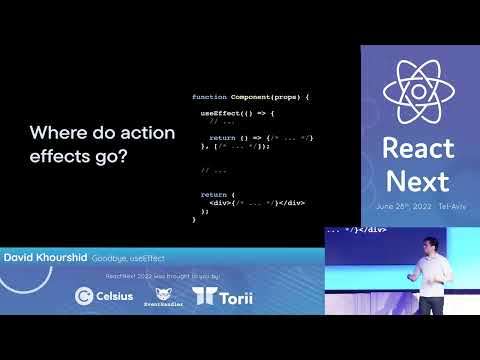
So we're either console.logging, sending analytics, making a post request, or just, you know, things like that. And so the idea is that useEffect needs to be able to unmount and remount, and so stop and restart that effect so that everything stays in sync. So again, useEffect is for synchronization, so with that said, where do action effects go? So we know that you can't have any side effects in render, and also you, you know, using useEffect is really just the awkward place to put them. So, like, where else could they go outside the component, like, what exactly does that look like? So, remembering the React 18 double execution? We know that when something happens caused by an event handler, a state change or something like that, you know, will have some effect happen. Because it's synchronized currently with the component rendering. And so the problem with that is, like, I said, React is allowed to say, Hey, I am going to unmount it and remount it again.
And as a result, those effects which you thought were safe are going to execute multiple times. So where should these go? Probably here and so now it doesn't matter. How many times your components unmount and remount? Your effects are only going to happen once during that event handler, so action effects happen outside of rendering and inside of those event handlers. So, you know, I said event handlers, like, for example, if we're submitting a form, we'll submit that data, but it's this is only sort of correct and sort of the mental model. But if you take anything away from this, talk, action, effects, go and event handlers. So let's talk about the mental model a little bit. And this will get cool, I promise you. So, React popularized the idea that UI is a function of states, and Redux popularize the idea that the next state is derived from the state. And the events that just happened. The problem with these two models is that it doesn't really leave any room for effects, so where do effects go?
Well? Here's an alternative model, and by alternative, I mean, this has existed since, you know, for many, many, many decades. And it's that, given the current state and the events that just occurred, we're going to get a tuple instead of the next state. And any effects that should be executed now. If you know Haskell or functional programming, you might actually recognize this as you know the Elm architecture, or, you know, some other things.
15:00 We know that when we toggle from mini to full…
So I'm going to show you a demo and just give you an idea of exactly how this works and how effects can actually, be part of state transitions. So let's say that you have an example app, and so this actually doesn't work yet. Because what we want to do is, we want this video to go from this mini view to a full view and then start playing. And then, when the video is over, we want it to stop and go back to the mini view. Or when we press the escape key, or when we click the video again, we want to stop playing and go back, all right. So instead of juggling useEffect and everything like that, what I'm going to do instead is, you guessed it, use a state machine. So don't be intimidated. This is not live coding, this is live diagramming, so it's a little bit easier on the eyes. So I'm going to add another state over. Here we're going to have a full state and so this is going to be when the video is shown full screen, all right, so how do we go back and forth between these?
Well, we toggle it so we could toggle that, and so we know that, you know, when we toggle back. So I'll do this right here, all right. And obviously, this is a very simple state machine. And this isn't exactly the point of like, why you would use a state machine, but one relatively unknown benefit of using a state machine is expressing effects. So we know that when we toggle from mini to full, we want the video to play. So I'm gonna add an action over here which is just video.play. And so when we toggle back, I want the video to pause, so I'm just going to type here video dot pause. And there's there's other things called invocations, and so these are. These are effects that are pretty much long lived and so you could think about them, as you know, the original use case for useEffect. These are long-lived effects where you have to synchronize with them.
And so there's two of them that we're going to listen to, we're going to listen to when the video ends, and we're also going to listen to Keydown.escape. Because we want to know when the escape event happens. We should actually go back to Mini, so I'm going to do that, so key dot Escape didn't want that new state, and also we are going to listen to video dot end it. So the idea is that, and I'll just simulate this. We're in the mini state. When we toggle, we go to full, and then when any of these three things happen, either the video ends, an escape key is pressed, or we toggle back to Mini. We want to, we want to go back to the mini state. But we also want the video to pause, so we know that pausing the video is going to happen in any of these events. And so this is one of the cool parts about state machines is that instead, you could simplify this and add an exit action.
So I'm just going to put video.pause over here and that way we don't need to do it here. All right, so I made a nice diagram. You're thinking, all right, this is pretty cool. I could have done this in Excalidra or in Miro, or Whimsical, or Lucidcharts, or whatever the heck you use. But instead, we're doing it here because this actually exports to code and hopefully this works. But if I paste the exact same code I copied over here and I have the, I have the actions already baked in here. So for video dot play, we call video wrapped on card now play. Hopefully it works. And so when we click, we go full screen. When I press Escape, go back click. When the video ends, it should go back to Mini again. And there you go. We live coded without, without coding, all right.
19:00 Not event handlers, but in state transitions…
So, this is all to say. When do effects happen? effects? You know, there's many places effects could happen, right? Middleware, callbacks, Sega's reactions, things monads, you know, things like that. No, they happen in state transitions always, and so where do these action effects go? Not event handlers, but in state transitions, which happen to be executed at the same time as event handlers. So again, if you take one thing from this talk, it's that, you know, you should be moving your action effects as close as possible to when the event occurs. So you could use a state machine if you want, or, for now, you could start with just putting it inside the handlers when you can. Now the following things, and I have about 10 minutes, so I'm gonna try to breeze through these and you all are pretty hungry. So, we're gonna talk about the React stocks and what they say about, this, basically this whole talk in a single page. In the in the docs where you might not need an effect, and they point out several areas where you could refactor your code.
To not use an effect first of all, like I said, you don't need an effect and you don't need useEffect. For handling user events, instead, move it to the event handler. So this is an example submitting data. We are putting it all inside of this useEffect. We're just tracking so many variables, and so this is loading variable is the one that's actually triggering the effect. Which doesn't really make sense, you should be thinking as a developer. When the user submits the form, that's when we post the events, not when the user submits a form. We change the iS loading variable and depending on what the is loading variable value is, we start sending it. Like, that doesn't make any sense, so the idea is that instead put it in form on submit. And of course, this could get a little crazy because you have to handle error errors and loading and things like that.
21:00 I have two variables over here, which is, items in total
So I highly recommend you move this to a to a hook instead, and so that hook. I really like this, this pattern where the first argument of your tuple is a state, and the second argument is something where you could actually communicate back with a hook. Because that gives you a lot of flexibility for synchronizing without having to juggle a lot of useEffects and use dates and things like that. And so this looks a lot like useReducer. But a little secret. You can imagine that this used checkout form is actually executing effect effects when the event happens, instead of wrapping it in useEffect. Also, you don't need useEffect for transforming data. This is something that seems obvious, but a lot of us accidentally do this in our code basis, so this is something to just keep in mind. So, for example, I'm trying to get the total of all of these items. And so I have two variables over here, which is, items in total. And so whenever the items change, we set the total to the sum of those items prices, right?
Well, you don't actually need useEffect for that, just put that right in there. And honestly, this is going to be fast. A lot of you get used memo happy, where it's like, I think this is going to be a slow operation. Computers are faster than you think. Honestly, only useMemo when you really, really, really need to. And you see that your app is sort of lagging a bit, all right. So you also don't need useEffect for communicating with parents. And so this is what I mean, and I've done this pattern a lot too. So, for example, when we click this button, we're toggling a quick view. For looking at a product and depending on IS open, we're going to call on open or on close so that our appearance knows. Hey, this component, this product, was opened or closed.
23:00 Using external store, which you can import directly from React
You don't need to do that. And we could use, again, the event handler strategy, where we're putting it inside of an event handler instead. And so, you know, we're setting the states. But we're also on, you know, checking what the next state is going to be and calling those right when the event happens. So we're also saving a potential rendering step, and you're limiting the amounts of renders that happen due to, changing the state and notifying the parents of any changes. You could also move this to a hook if you want to. And again, this is just a cleaner way of expressing the same thing again without using useEffect. And so you're gonna see examples like this in the React beta documentation, too. Here's another fun one you don't need useEffect for subscribing to external stores. And if you were at the meetup last night, I actually went more. I did more of a deep dive into this one, but the USync external store is a really great hook that's, now baked into React 18 so you could use it directly, and it's a magical hook.
It really simplifies the way that we do a lot of common things in React. So in this example, I have no dependencies, but I still need to do that. Typical useEffect use case, where I subscribe to something and then I set state based on the values that I'm subscribing to. And so this is honestly a lot of boilerplate. We have to useState, we have to useEffect, we have to make sure to clean it up. We're really listening to some sort of external store, which is that store API over there. This can be cleaned up using useSyncExternalStore, and here's what that looks like. That's it. So, using external store, which you can import directly from React. It takes three arguments first is a way to subscribe to the to the external store, second is a way to get the latest state. And so this is to prevent tearing if you're using this in multiple components, and the third one.
Is for server rendering, just to give the server an initial value. So instead of saying that connected is true by default, you put it as the third arguments over there. And so, uh. XState uses that useSyncExternalStore, and so it treats these state machines as external stores. And like I showed in the previous demo, you could express all of these effects inside of that, so that your external stores could be what handles effects. And, also manages dates and receives events. So here's probably the biggest one. And I'm glad I still have a little bit of time for this because it's been the biggest question and one of the biggest sources of frustration. You don't need useEffect for fetching data, believe it or not, so here is a very, very common pattern that we do. And honestly, you might still have to do this. Depending on your use cases, the version of React you're using, limitations, etc.
Also the framework that you're using. But we have this is canceled equals false.
26:00 You could actually start fetching before your component mounts…
And this is sort of just a muscle memory thing that we have to do whenever we fetch data inside of useEffects. Because we're going to get our items. And if that was cancelled because something changes? Oh, I just realized I forgot a dependency array, so this is going to be a very expensive API call. So, we set items, you know, if you know if is cancelled is false. And we're still allowed to make that promise. But there's another way. And so what React's recommendation is to actually use frameworks. So hopefully I got the syntax correct. But if you went to Kent's talk earlier today, he talked about this too, where I mean, I love this. You have. You see no useEffects in here. And also if you look if you saw Ryan's talk from Reacted on, you could see that he was just removing useEffect after useEffect and just putting it in loaders.
So Remix has a native way, a built-in way of handling the loading of data before your component mounts, because fetching data during component mounting is too late. You want to start fetching before that, and so that is, render as you fetch, or fetch then render. Those are the patterns that React. Talks about there's also Next.js get server side props. If you're using that same idea, you're fetching your server side, and then you're giving it to the to the components. Now, some of you might not have the ability to do this. So, instead, you know, you might use something like React query, and I highly recommend you use React query with useQuery. Because it's going to do caching and it allows you to prefetch those queries too. So you could actually start fetching before your component mounts, so highly recommend this library. And I'll also talk about some of the problems that Dan Abramov actually recently mentioned about useEffect and fetching inside of it.
First of all, race conditions if you forget that is loading or is cancelled boolean, then you might have race conditions with multiple fetch calls happening at the same time. Also, there's no instant back button. So, you're going to, you know, maybe load some data. And then when you go back a screen because you're fetching in your component, you're going to see all of those loading spinners again. I hate seeing loading spinners, especially if it's like, I know that you have this data, like, why are you showing me that you're loading it? It's, it's somewhere in there, just show, show, it's to me again. Also, no initial HTML content, like, Kent talked about again. You know, you're just going to see an empty HTML shell with a bunch of loading spinners. That's not a really good user experience. And also we're chasing waterfalls. Because we're going to have the parents component, that's something, and then the child component won't even get a chance to fetch until the parent component is done fetching.
So it's just really not a good user experience, and you should start thinking about moving your fetches away from useEffect. So this is all in the React documentation, which does not have a really pretty, URL, but just search for it. Look for Dan Abramov's tweets, I'm sure he tweeted about it somewhere there. So, also, real quick. You don't need useEffect for initializing global singletons, you could just do it. So, here's one of those you could use. A ref don't really recommend doing that. I'm just going to skip ahead to the good. Part which is just call it outside the component. Some of you might be complaining, like, Hey, what about SSR? Check for the window, what about testing? Wrap it in the function. Just you don't need to put this in useEffect, so in summary, in hopefully in 20 seconds, useEffect is for synchronization. State transitions are what trigger effects, which means you put them in your event handlers when you can action effects, go inside those event handlers.
You should render as you fetch, and also you should model your effects with steep machines. Just because it's a really cool thing to do so. Think you React next boom right on time. [Music] you.
Related talks
-
Using useEffect Effectively
React Advanced London 2022. 24:23, 7.5K views -
Goodbye, useEffect
Reactathon 2022. 26:00, 240.2K views -
Goodbye, useEffect
BeJS, 2022. 29:58, 516.1K views -
useWat
React Rally 2023. 32:41, 2.7K views